


Yale Access
4.61.03K Reviews
App Specs
- Version
- 26.15.0
- Updated On
- License
- Free
- Downloads
- 500,000+
- Developer
- August Home, Inc.
- Categories
- Lifestyle
- Platform
- Android
Screenshots

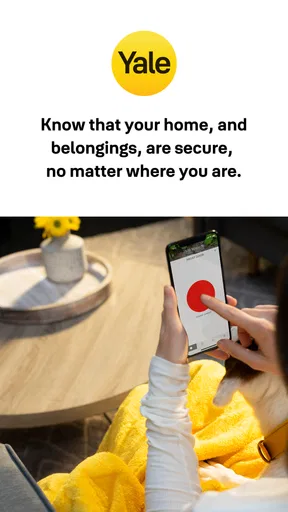
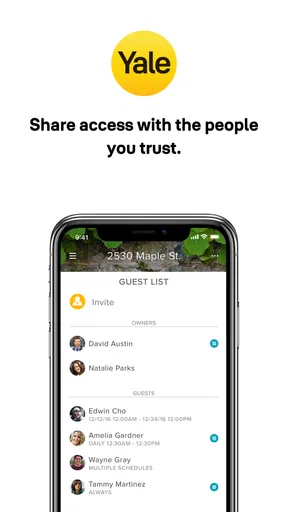

 Analysis by AppCompare
Yale Access is the kind of lifestyle app that makes sense only when it is connected to a Yale Access device, yet that relationship is exactly what gives it value. I used it as the phone-based control point for a Yale smart lock, and the experience felt less like browsing an app and more like carrying a remote key, access manager, and status checker in my pocket. Its usefulness depends on how confidently it connects your phone, the app, and the lock at the moment you need them.
That makes this a more focused product than a general smart-home dashboard. It is not trying to control every appliance in the house. Instead, it concentrates on entry access, which is a small part of daily life but an important one. August Home, Inc. develops the app, and the free download is aimed at everyone rather than a specialist audience. The current release is version 26.15.0 and works on devices running Android 8.0 or later.
How Yale Access feels when connectivity matters
When I rely on a phone to operate a door lock, a slow connection changes a small delay into a practical question: did the command reach the device, and what should I do next? I look at connectivity as part of the whole entry routine, not just an app setting. That perspective helps explain why a careful test at home—and a clear backup plan—matter before I depend on phone control while away.
The first setup is really about creating trust
Installing the app is straightforward, but the meaningful work starts when you connect it to a Yale Access device. This is where I paid more attention than I normally would to permissions, account details, and the phone’s connection state. A lock is different from a music app: if a screen takes an extra moment to load, that is mildly annoying; if I am standing outside with groceries, rain, or a tired child, the same delay feels much more serious.
The app’s basic purpose is easy to understand. It gives me a way to interact with a compatible Yale device from my smartphone, rather than relying entirely on a traditional key. The interface is most useful when it presents the lock’s current state clearly and makes the next action obvious. I do not want decorative screens or a long chain of menus when I am at the front door.
My advice is to complete setup at home, with the phone charged and the lock accessible, instead of trying to configure everything during a rushed arrival. I also recommend testing the normal lock and unlock process several times before treating the phone as part of your everyday entry routine. That small rehearsal reveals whether the device, app, and phone communicate reliably in your particular home.
A realistic arrival shows both the strength and the weakness
Imagine returning from shopping with both hands full. With the app ready and the connection behaving, the phone becomes much more convenient than searching for a key. I can open the app, check the lock, and use the available control without putting the bags down immediately. That is the kind of ordinary moment where Yale Access earns its place.
Worth Reading Before You Choose

EA SPORTS FC Mobile 26 Is a Bigger Football Game, but It Takes Time

Flipboard Shows What News Apps Must Do Beyond the Feed

Switching to Android Auto Means Rethinking Your Driving Routine

Google Calendar Makes a Crowded Week Easier to Manage

Ludo King Makes the Most of the Minutes Between Plans

Baby Panda World Brings Quick Play to Modern Phones, but Its Game Library Feels Busy
The trade-off appears when the app needs to establish communication at exactly the wrong time. A weak mobile signal, a busy home network, a phone that has restricted background activity, or a lock that is slow to respond can turn a simple action into a pause-and-check situation. I would not describe that as a flaw unique to this app; it is the unavoidable cost of making a physical lock depend on connected technology. Still, it changes how I use it. I keep a practical backup plan rather than assuming a phone will always behave like an instant key.
This is also why I prefer checking the lock state before leaving home when I have any doubt. If I am heading to the airport or going to bed, confirming the state while I am still indoors is less stressful than discovering a connection problem from the sidewalk. The app is most reassuring when used proactively, not only as an emergency button.
Mobile use is where the app has its clearest advantage
Yale Access is designed around the phone, so the experience fits naturally into situations where I already have my device in hand. The app is especially practical for people who frequently move between home and work, manage a property, or need to coordinate entry without passing around a physical key. It can also be useful for households where different people have different access arrangements, provided the connected Yale setup supports the access pattern they need.
I would be careful about choosing it solely because it sounds more modern than a key. The best reason to use it is convenience around a compatible Yale lock, not novelty. If everyone in a household prefers a simple physical key and rarely needs remote-style access management, the phone may add another thing to charge, update, and troubleshoot without solving a real problem.
On a phone, small details matter. I found it helpful to keep the app easy to reach rather than burying it in a folder, especially when arriving at night. I also avoid opening it for the first time in a hurry. Launching it occasionally at home gives me a better sense of the normal response and makes an unusual delay easier to recognize.
What happens when the connection is imperfect
The most important limitation is that the app cannot be judged separately from the network path between the phone and the Yale device. A connected lock may involve several points of friction: the smartphone’s current connection, the home’s internet environment, the device itself, and the app’s ability to refresh the relevant state. When one part is slow, the app can feel slow even if its controls are well designed.
When a command does not appear to work immediately, I do not tap repeatedly. First, I check whether the app has refreshed its display. Then I verify that the phone has a usable connection and that I am interacting with the intended Yale device. If the state remains unclear, I step back from the assumption that the action completed. That is a safer habit with any smart-lock app: uncertainty should lead to verification, not frantic repetition.
Recovery is easier when I separate an app problem from a lock problem. Closing and reopening the app may help when the screen is stale, while moving to a place with better phone reception can address a mobile-network issue. If the physical device itself is not responding as expected, I treat that as a hardware or power concern rather than endlessly blaming the interface. The app cannot make every connected component healthy.
I also suggest keeping the phone’s operating system and the application reasonably current, while avoiding an update immediately before an important trip. The release installed on my test phone was 26.15.0, and the minimum operating-system requirement is Android 8.0. Users with older phones should check compatibility before building their entry routine around it. On iOS or Android, the practical question is the same: can the phone run the app comfortably and maintain the connection when needed?
Connectivity changes the meaning of convenience
A traditional key has a very narrow job and a very predictable failure mode: it can be lost, damaged, or left inside. Yale Access replaces some of that simplicity with a chain of digital dependencies. In exchange, the phone can become more flexible and easier to manage in situations where physical keys are inconvenient. I see that as a trade, not an automatic upgrade.
For a renter or homeowner who already owns a compatible Yale device, the app can be a sensible companion. For someone still deciding how to secure a door, the app should be considered together with the lock, the home’s connectivity, the household’s comfort with smartphones, and the consequences of a failed connection. I would not choose it for a remote property with unreliable service unless I had carefully tested the complete setup and retained another dependable way to enter.
It is also worth thinking about visitors. A phone-based access system can reduce the need to hand over a key, but it does not remove the need for clear communication. Before giving someone access, I would confirm which device they should use, what they should do if the app does not refresh, and how they can contact me. The app may simplify the permission side of entry, but the human instructions still matter.
Using it without wasting attention or data
Yale Access is not an app I need to stare at throughout the day. I use it when I have a specific reason: checking the lock before leaving, managing an entry task, or dealing with an arrival. That limited, intentional pattern is better for battery, mobile data, and peace of mind than repeatedly refreshing the status out of habit.
On a limited data plan, I would reserve important checks for a reliable connection whenever possible and avoid repeatedly reopening the app simply because a screen took a moment to update. I would also review the phone’s battery-saving behavior. Aggressive background restrictions can affect how quickly apps reconnect or refresh, although changing those settings may increase battery use. The right balance depends on whether immediate access convenience matters more to you than squeezing out the longest possible battery life.
Privacy is another reason to be deliberate. A smart-lock app is tied to a sensitive part of daily life: when people enter and leave. I do not grant access casually, and I keep the phone itself protected with the security features I already trust. Yale Access cannot compensate for an unsecured phone. If someone can freely use the device, the digital key deserves the same caution as a physical one.
One useful habit is to distinguish a displayed state from a confirmed physical result. If I ask the app to change the lock and the response is delayed, I do not assume that the screen’s first state is the final one. I wait for a clear update or check the door directly when I am nearby. That extra moment is worthwhile because connected interfaces can lag behind real-world hardware.
Who will appreciate it most
I think Yale Access is best for people who already have a compatible Yale Access device and want their smartphone to be part of the entry routine. It suits users who value checking access from a phone, who are comfortable troubleshooting a connection, and who understand that convenience can depend on several devices working together.
It may also appeal to households that dislike copying physical keys or want a more organized way to handle entry. The value is strongest when several everyday situations make a phone-based control useful, rather than when the app is installed once and forgotten. The free price removes a barrier to trying the software, but the wider cost and responsibility of a connected lock still belong in the decision.
I would skip it if you want an entry method that is completely independent of phones, accounts, networks, and software maintenance. I would also hesitate if your phone is old, frequently out of battery, or often left behind. In those cases, a conventional key or a different access arrangement may be a better fit. Likewise, people looking for a broad smart-home control center may prefer an app built around many device categories instead of this focused Yale companion.
How it compares with ordinary alternatives
Compared with a physical key, Yale Access offers more flexibility but introduces more variables. A key does not need a screen to load or a network to answer, while the app can be more convenient when I want phone-based control and a clearer digital routine. The physical option wins for simplicity; Yale Access wins when connected access is genuinely useful.
Compared with a general smart-home application, this app has a narrower purpose. That focus can be an advantage because I am not searching through lights, cameras, thermostats, and scenes to find the lock. The disadvantage is equally clear: its usefulness is tied to Yale’s ecosystem rather than a broad collection of unrelated devices. I would choose the focused approach when the Yale lock is central to my needs, and a broader platform when I want one place for an entire smart home.
Compared with another lock maker’s app, the deciding factor should be the lock already installed or the ecosystem I intend to buy into. Switching between apps is rarely worth it just for a different interface. Yale Access makes the most sense as part of a Yale setup, not as a standalone lifestyle download with value independent of the hardware.
My overall view of the connected experience
The app has earned a strong reception, with a 4.6 average from around 3.2 thousand ratings and roughly 1 thousand written reviews. It has passed half a million installs, which gives me some confidence that it is not an obscure experiment. Those figures are useful context, but they do not remove the need to test the app with the specific lock, phone, and network I would depend on.
Its everyone content rating and free availability make trying it approachable, while the Android 8.0 requirement keeps it accessible to many older devices. Still, compatibility on paper is not the same as a smooth experience at the front door. The most valuable test is practical: install it at home, connect the Yale device carefully, try normal entry several times, and see how it behaves when the phone’s connection is less than ideal.
My final opinion is positive but conditional. Yale Access can make a compatible Yale lock feel more convenient and manageable, especially for people who already organize much of daily life through a smartphone. Its weakness is not that it lacks a clever idea; it is that every connected convenience carries a recovery question. If you are comfortable keeping a backup plan and treating connectivity as part of the lock’s operation, Yale Access is a useful lifestyle app rather than a gimmick.
I would recommend it to an existing Yale device owner who wants phone control and is willing to test the complete setup. I would not recommend replacing a dependable key routine without first learning how the app behaves in your own home. That distinction sums it up: Yale Access is convenient when the connection is ready, but responsible use means planning for the moments when it is not.
Pros
- Unlock and manage compatible Yale smart locks from your phone.
- Temporary access codes make sharing entry with guests convenient.
- Activity history helps you monitor lock usage and entry events.
- Supports hands-free Auto-Unlock on compatible devices and settings.
- Remote control can be useful for checking or securing your home away.
Cons
- Requires compatible Yale hardware and may not work with every lock model.
- Some remote features depend on a stable internet connection.
- Battery-powered locks still need regular battery replacement.
- App permissions and account setup may feel extensive for new users.
- Advanced features may require additional Yale hubs or accessories.
FAQs for Yale Access
What is Yale Access, and what can I use it for?
Yale Access is a smart-home app designed to control compatible Yale smart locks and related devices from a phone. After pairing a supported product, you can lock or unlock the door, check its status, create entry codes, manage users, and review activity history. The exact functions depend on your Yale device, region, account type, and the connectivity accessories installed in your home.
Does Yale Access work with every Yale smart lock?
No. Yale Access is intended for selected Yale smart locks and connected products, so compatibility should be checked before downloading or purchasing additional hardware. Availability can vary by country and product generation. Some locks may require a Yale Connect Wi-Fi Bridge or another compatible module for remote control, while Bluetooth-only models may offer local control when your phone is nearby.
Can I unlock my door remotely with Yale Access?
Remote locking and unlocking may be available, but it normally requires a compatible Yale lock, a stable internet connection, and the appropriate bridge or Wi-Fi accessory. Without that setup, the app may only communicate with the lock over Bluetooth when you are close to it. Before relying on remote access, test the configuration and keep a physical key or backup entry method available.
Is Yale Access secure, and how are guest permissions managed?
Yale Access includes account-based controls intended to help you manage access more safely than sharing a physical key. Depending on the lock, you can invite household members or guests, assign entry permissions, and remove access when it is no longer needed. Use a strong account password, protect your phone, enable available security features, and review activity logs regularly for unfamiliar events.
What happens if my phone, internet connection, or battery fails?
The effect of a failure depends on the Yale lock model and how it is configured. A dead phone battery can prevent app access until the phone is charged, while an internet outage may disable remote features but still allow local Bluetooth operation or manual unlocking. The lock itself generally uses its own batteries, so monitor battery warnings and keep an emergency entry option available.


